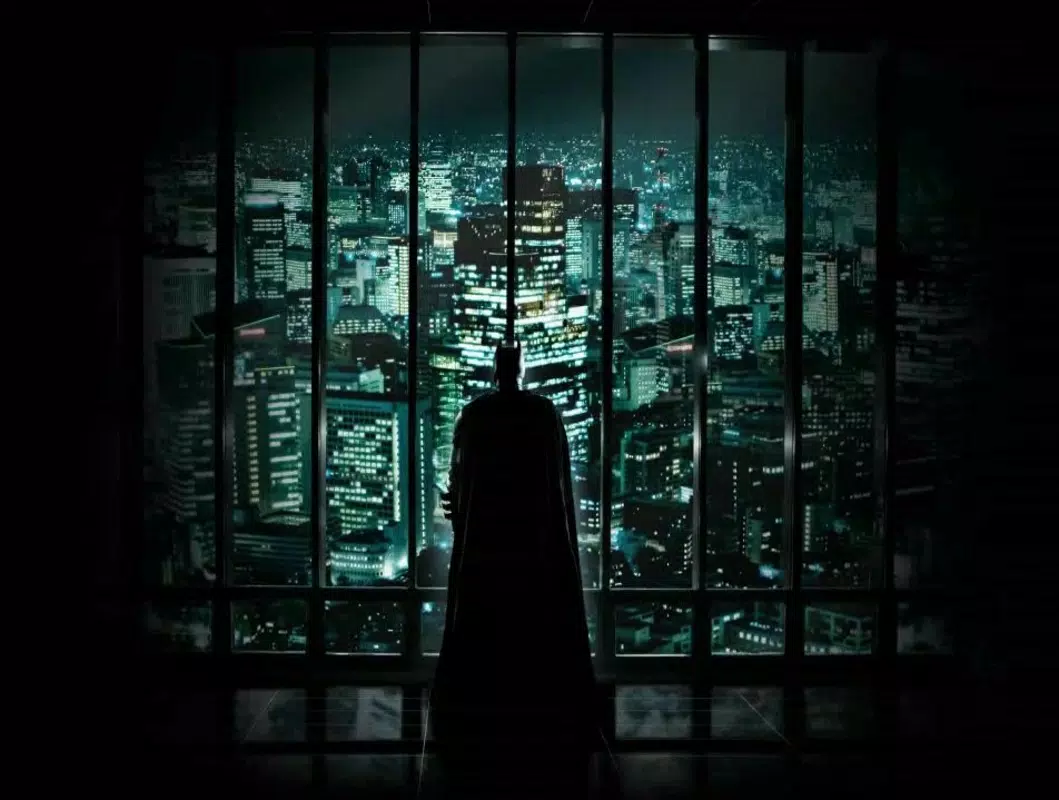

Download The Dark Knight: Screensaver – Batman, Joker, Gotham City, Dark Knight, screensaver, free, desktop, Windows, movie, superhero
Overview
The Dark Knight: Screensaver offers fans of the iconic 2008 film a visually immersive experience by transforming their desktop into a cinematic representation of Gotham City. Designed by Jason A. Bilbrey, this screensaver captures the film’s signature dark, brooding aesthetic and brings it to life through high-contrast imagery and dynamic animation.
Its primary purpose is to serve as a digital tribute to the movie, allowing users to engage with the atmosphere of Batman’s world even when their computer is idle. The app targets fans of superhero cinema, particularly those drawn to the complexity of the Joker character and the legacy of Heath Ledger’s performance. It functions as a utility for personalizing a Windows desktop with cinematic flair, enhancing the user’s daily digital environment with thematic content.
Although the developer did not provide additional technical details, the screensaver’s focus on visual storytelling and emotional resonance underscores its value within the niche category of movie-themed desktop utilities. Its release in 2008 aligns with the cultural impact of The Dark Knight, making it a historically relevant digital artifact for film enthusiasts and collectors of nostalgic software. The app contributes to the broader ecosystem of fan-driven digital content by offering a free, accessible way to celebrate a landmark film.
Key Features & Functionality
- Iconic Visuals: The screensaver features high-contrast, film-inspired imagery of Batman standing atop Gotham City’s skyline, evoking the movie’s dramatic tone. These visuals are carefully designed to mirror the cinematography of the original film, allowing users to feel immersed in the world of the Dark Knight.
- Dynamic Movement: A second animation sequence introduces a ground-level perspective with animated falling cards bearing the Joker’s face. This subtle motion adds life to the idle screen, reinforcing the film’s sense of unpredictability and tension.
- User-Friendly Installation: The setup process is straightforward, requiring minimal technical knowledge. Users can install the screensaver with a single executable file, making it accessible to casual users and non-technical audiences.
- Free to Download: Available at no cost, the screensaver ensures broad accessibility for fans of all backgrounds. This model supports community engagement and allows the app to reach a wide audience without financial barriers.
- Legacy Tribute: The design pays homage to Heath Ledger’s portrayal of the Joker, using visual cues and thematic elements that reflect the character’s psychological depth and cultural impact.
These features combine to create a personalized desktop experience that goes beyond simple decoration. For instance, a fan working late at night might feel a stronger emotional connection to the film’s atmosphere when the screensaver activates. Similarly, collectors of vintage movie software may appreciate its historical relevance and nostalgic value. The screensaver’s functionality is limited to visual display and animation, but its purpose is clear: to serve as a digital keepsake for fans of The Dark Knight.
Interface, UX & Performance
The interface of The Dark Knight: Screensaver is minimal and focused on visual delivery rather than user interaction. It operates in the background when the computer is idle, requiring no active input from the user. The visual style emphasizes dark tones, sharp contrasts, and cinematic composition, closely mirroring the film’s aesthetic.
Navigation is not required during runtime, as the screensaver activates automatically after a set period of inactivity. The user experience is streamlined, with no menus, settings, or configuration options visible during playback. This simplicity ensures that the app remains unobtrusive and efficient.
Although the developer did not list formal performance metrics, the 2.5 MB file size suggests lightweight operation, likely resulting in low CPU and memory usage. The screensaver is expected to run smoothly on standard Windows systems from the era of its release. Responsiveness and stability appear consistent with typical screensaver behavior, though no specific compatibility data was provided.
Users may experience minor lag on older hardware, but the app’s design prioritizes visual impact over resource-intensive effects. Overall, the UX is optimized for passive enjoyment, making it ideal for desktop users who value ambiance over interactivity.
Platform Compatibility & Technical Requirements
The Dark Knight: Screensaver is designed for the Windows operating system. It is compatible with Windows platforms released around the time of its 2008 release, though specific version requirements were not listed. The file size is 2.5 MB, indicating a compact and lightweight application.
The developer did not specify minimum OS requirements, nor did they provide details about hardware specifications or supported display resolutions. As such, compatibility with modern Windows versions cannot be confirmed. However, the app’s simplicity and small footprint suggest it may still function on current systems through compatibility modes.
Users are advised to test the executable in a safe environment before use. The absence of detailed technical information limits definitive conclusions about performance on newer devices. Nevertheless, the app’s straightforward design and low resource demand make it a viable option for legacy systems or users seeking a nostalgic desktop experience.
Pros and Cons
- Free to download and use, making it accessible to all fans
- High-quality visuals inspired by the original film
- Simple installation process with no complex setup
- Dynamic animation adds life to the idle screen
- Acts as a tribute to Heath Ledger’s iconic performance
- Not available for mobile or non-Windows platforms
- No user-configurable settings or customization options
- Compatibility with modern Windows systems not confirmed
- Outdated design may not appeal to newer users
- Does not support high-resolution displays beyond original release standards
FAQ
Is The Dark Knight: Screensaver safe to download?
The app is available from a known developer and has no reported malicious behavior. However, as with any third-party software, users should download from trusted sources to ensure security.
Can I use this screensaver on a modern Windows PC?
While the developer did not confirm compatibility with current Windows versions, the lightweight file size and simple design suggest it may run on modern systems using compatibility mode.
Does the screensaver require an internet connection?
No, the screensaver operates offline. All content is included in the 2.5 MB file and does not require online access.
Is there a mobile version available?
No mobile version has been released. The app is exclusively designed for Windows desktops.
How do I install The Dark Knight: Screensaver?
Download the executable file, run it, and follow the on-screen prompts. Once installed, it can be selected through the Windows Display Settings under the Screensavers tab.
Final Thoughts
The Dark Knight: Screensaver remains a compelling piece of digital nostalgia, offering fans a visually rich way to honor one of cinema’s most iconic superhero films. Its focus on atmosphere, iconic imagery, and tribute to Heath Ledger’s legacy sets it apart in the niche category of movie-themed desktop utilities. While limited in functionality and not optimized for modern systems, its simplicity and free availability make it a worthwhile addition for collectors, retro enthusiasts, and dedicated fans.
The app’s ability to transform a mundane desktop into a cinematic scene speaks to the enduring power of The Dark Knight’s storytelling. For those who appreciate the film’s dark tone and visual grandeur, this screensaver delivers a meaningful, low-effort enhancement to their digital space. It’s not just a tool—it’s a tribute.
Download The Dark Knight: Screensaver now.


